7 days free, no credit card
DJ software: build your mix on a timeline
DJ.Studio is DJ software for Windows and macOS that works on a timeline instead of live decks. You add your tracks, Harmonize suggests an order by key and BPM, and you shape every transition before you export the finished mix. It's made for preparing sets, online mixes, and radio shows, next to the live DJ software you already use.
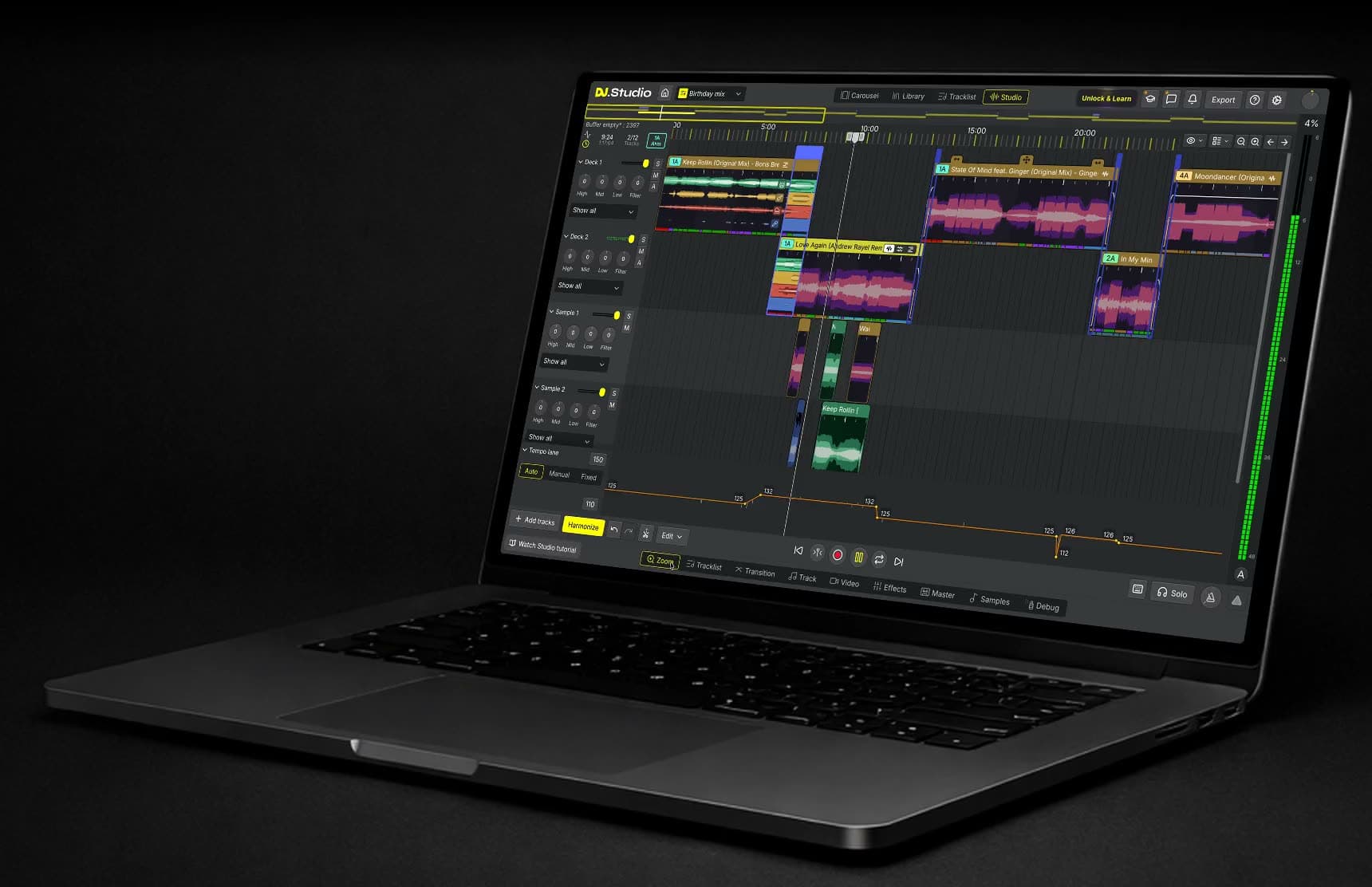
DJ software for building mixes, not just playing them
Most DJ mixing software is made for performing: virtual decks, a crossfader, and a mix that happens in real time. DJ.Studio lays the whole set out on a timeline, from the first track to the last. You see every transition at once, drag a track to move it, trim intros and outros, and change a blend as often as you like. That makes it a good fit for a mix you publish online, a weekly radio show, a mashup, or a live set you want to prepare at home. On the night itself you still play live, you just know what's there.
How DJ.Studio works
Four steps from a folder of tracks to a finished mix.
1. Add your tracks
Use your own files, a library from rekordbox, Serato, Traktor, VirtualDJ, or iTunes, or streaming tracks from Beatport.
2. Let Harmonize suggest an order
Harmonize checks the key and BPM of every track and suggests a running order that flows. You can move any track afterwards.
3. Shape each transition
Zoom in on a blend and set its length, EQ, filters, effects, and stem moves. Every change stays editable on the timeline.
4. Export and share
With a paid plan, export the mix as audio or video, upload it to Mixcloud or YouTube, or send the playlist to your live DJ software.
Sort your tracks by key and BPM
Harmonize is DJ.Studio's harmonic playlist tool. It compares the key and tempo of every track in your playlist and suggests an order based on the Camelot wheel, with beat-matched transitions in between.
Choose Fuzzy Mixing for safe, closely related keys, which suits a live set or radio show. Choose Mood Mixing for bolder key changes in a studio mix you refine transition by transition. You decide which suggestions to keep.
Shape every transition
Each transition in DJ.Studio has its own editor. Set where a blend starts and how long it lasts, then draw the volume, EQ, and filter moves you want.
More than 50 effects are built in, including Pioneer DJM emulation, and you can load VST3 and AU plugins. Because every move is automation on the timeline, a blend you liked yesterday sounds the same tomorrow. See what's possible on the transitions page.
Separate your tracks into stems
Stem Separation splits your tracks into vocals, drums, bass, melody, and instrumental parts. Use it to lay the vocal of one track over the beat of another, keep two basslines from clashing in a transition, or build a mashup.
Stem Separation is included in the free trial. Read more on the stems page.
Use your own library and Beatport
DJ.Studio works with your own files, plus libraries from rekordbox, Serato, Traktor, Engine DJ, VirtualDJ, djay Pro, Mixed In Key, and iTunes, and streaming tracks from Beatport.
So you don't have to start from scratch: open the crates and playlists you already have and build the mix from there. Switching from MixMeister? DJ.Studio reads your MixMeister projects too.
Export to audio, video, or your DJ software
When the mix is ready, export it as WAV, MP3, or FLAC, or as an MP4 video with visuals that react to the music. You can upload straight to Mixcloud and YouTube with an automatic tracklist.
Playing the set live? Send the playlist with cue points to rekordbox, Serato, VirtualDJ, djay Pro, Traktor Pro, or Engine DJ. Producers can open the mix with stems in Ableton Live or Bitwig. Exporting is part of the paid plans, not the free trial.
How DJ.Studio compares with other DJ software
Here's how DJ.Studio compares with rekordbox, Serato, Traktor, VirtualDJ, and djay Pro on the way you mix, controller support, stems, and the finished mix:
How you mix | DJ controller | Stem separation | Finished mix | Free option | |
|---|---|---|---|---|---|
DJ.Studio | On a timeline, transition by transition | Not supported | Built in | Exported as a file | 7-day trial, no credit card |
rekordbox | Live on virtual decks | Supported, built around AlphaTheta (Pioneer DJ) gear | Built in | Recorded while you play | Free plan |
Serato DJ Pro | Live on virtual decks | Works with supported controllers | Built in (Serato Stems) | Recorded while you play | Serato DJ Lite (free) |
Traktor Pro 4 | Live on up to four decks | Supported, mostly Native Instruments hardware | Built in | Recorded while you play | None, one-off purchase |
VirtualDJ | Live on virtual decks | Very wide support | Built in (Stems 2.0) | Recorded while you play | Free for non-professional use without a controller |
djay Pro | Live on virtual decks | Supported | Built in (Neural Mix) | Recorded while you play | Free version, PRO subscription for more features |
For gigs with a controller, a deck-based program is the right tool. DJ.Studio prepares the set, then hands the playlist to your live software. Read the full comparisons of DJ.Studio vs rekordbox and DJ.Studio vs Traktor.
Who uses DJ.Studio
From bedroom DJs to working DJs who mix every week.
Radio and podcast makers
Record voice-overs, set the transitions, and export the show in one place, then publish it on Mixcloud with the tracklist.
Mobile and wedding DJs
Plan the evening's playlist and test the tricky transitions at home, before the day itself.
Club DJs
Prepare a set on the timeline, then send it with cue points to rekordbox, Serato, VirtualDJ, or djay Pro for the gig.
Bedroom DJs
See how a transition works instead of guessing, and make mixes you're happy to share.
Trusted by working DJs
Used by more than 360,000 DJs worldwide.
DJ.Studio brings production style workflows to DJs.
DJ.Studio is a great tool for quickly assembling mixes--and for finding which tracks work well together for live DJ sets ... It solves a lot of problems for busy DJs and helps me get through more music.
Which DJ software fits how you work?
Many DJs use two kinds of DJing software: one to prepare a set, one to play it.
You play live with a controller
Deck-based software such as rekordbox, Serato, Traktor, or VirtualDJ is built for that. Use it on the night itself.
You build a mix before anyone hears it
An online mix, a radio show, a mashup, or a prepared set. That's what DJ.Studio is made for.
You do both
Prepare the set in DJ.Studio, then send the playlist with cue points to your live software and play it there.
What DJ.Studio doesn't do
It isn't built for performing live with a DJ controller, and it isn't a full DAW for producing tracks from scratch.
DJ.Studio on Windows and Mac
DJ.Studio is a desktop app for Windows 10 and 11 and for macOS, on Intel Macs and Apple Silicon Macs (the M-series, M1 to M5). A one-time license covers one user on two computers, so you can mix on a Mac at home and a Windows PC in the studio.
Read more about DJ software for Mac and DJ software for Windows, or check the system requirements before you start.
Questions about DJ software
- What is the best DJ software?
It depends on how you work. For live sets with a controller, rekordbox, Serato, Traktor, and VirtualDJ are common choices. If you want to build a mix on a timeline and refine every transition before you export it, DJ.Studio is made for that. For a longer list, including free options, see our guide to the best DJ software.
- Does DJ.Studio run on Windows and Mac?
Yes. DJ.Studio is a desktop app for Windows 10 and 11 and for macOS, on Intel and Apple Silicon Macs (M1 to M5). A one-time license covers one user on two computers.
- Can I try DJ.Studio for free?
Yes, for 7 days without a credit card. Stem Separation is included in the trial. Exporting a mix needs a paid plan, and the trial doesn't turn into a subscription unless you choose to buy.
- Do I need a DJ controller?
No. You build the mix on the timeline with a mouse or trackpad. DJ.Studio doesn't support DJ controllers, so for a live gig you send the playlist to your live DJ software.
- Can I use my rekordbox or Serato library?
Yes. DJ.Studio works with libraries from rekordbox, Serato, Traktor, Engine DJ, VirtualDJ, djay Pro, Mixed In Key, and iTunes, and with your own music files.
- Which DJ software sorts tracks by key and BPM?
DJ.Studio's Harmonize checks the key and BPM of every track and suggests a running order based on the Camelot wheel. You decide which suggestions to keep.
- What's the difference between DJ.Studio and rekordbox?
rekordbox is built for playing live on virtual decks, mostly with AlphaTheta (Pioneer DJ) gear. DJ.Studio is built for preparing and exporting a finished mix on a timeline. You can export a DJ.Studio playlist with cue points to rekordbox.
- How much does DJ.Studio cost?
There are one-time licenses, which include 12 months of updates, and a monthly plan. One-time licenses come with a 14-day money-back guarantee. Prices change during sales, so check the pricing page for today's prices.
Try DJ.Studio free for 7 days
Download DJ.Studio and use the Pro+Stems features for 7 days, no credit card needed. You can build mixes during the trial, but not export them, and nothing is charged unless you choose a plan yourself.
Love your one-time license or get a full refund, no questions asked: every one-time license comes with a 14-day money-back guarantee. Plans and prices can change, so check pricing for the current options.